2 years ago
Hey y'all,
Today we're opening beta access to Sealed Variables. 🔐
Sealed Variables provide an extra layer of security. When a variable is sealed, its value is provided to builds and deployments but is never visible in the UI nor can it be retrieved via the API.
Create a new sealed variable
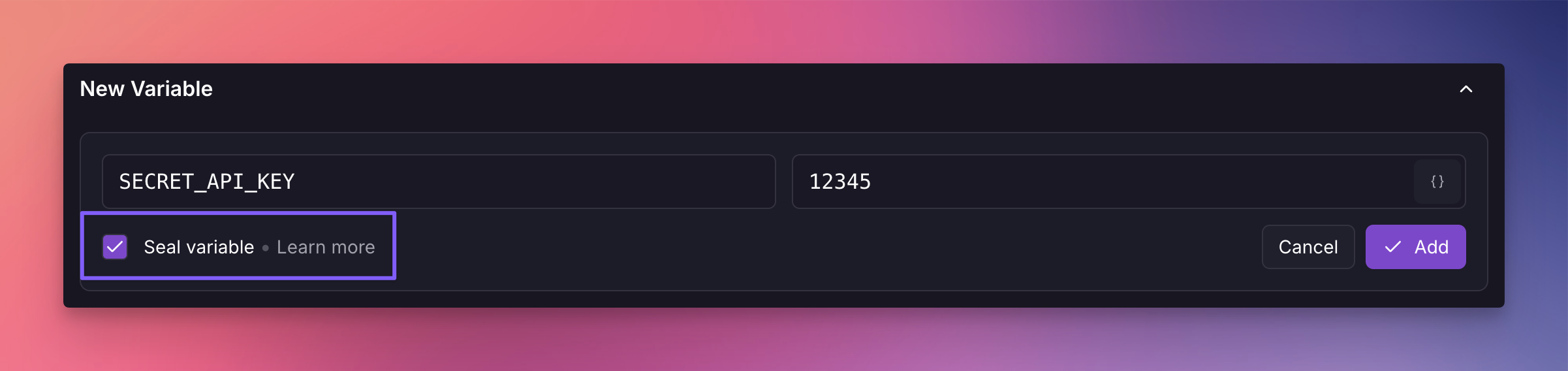
To create sealed variable, check the "Seal variable" option when adding a new variable.
Seal an existing variable
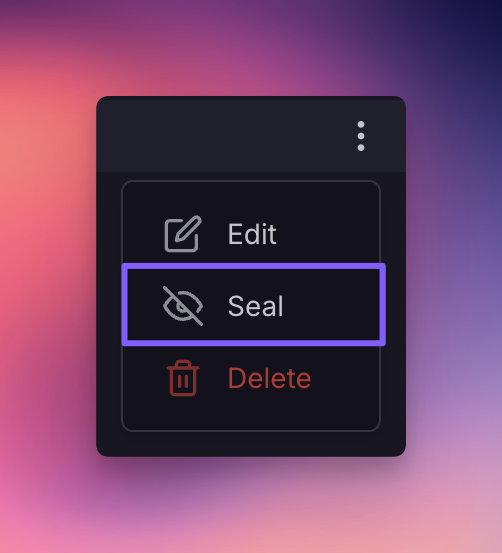
To seal an existing variable, click the 3-dot menu on the right-side of the variable and choose the "Seal" option.
You can read more about sealed variables on their docs page.
We'd love for you to try the feature and give us your feedback. Let us know what you like, what you don't like, and what else you'd like to see from this feature.
👋
0 Threads mention this feature
4 Replies
2 years ago
This thread has been marked as public for community involvement, as it does not contain any sensitive or personal information. Any further activity in this thread will be visible to everyone.
Status changed to Open fp • almost 2 years ago
Status changed to Completed unicodeveloper • over 1 year ago
9 months ago
How do you 'unseal' a variable? I accidentally 'fat-fingered' the button to seal a variable instead of 'edit' and now I can't unseal it
cryptomius
How do you 'unseal' a variable? I accidentally 'fat-fingered' the button to seal a variable instead of 'edit' and now I can't unseal it
9 months ago
Sealing a variable is a one-way action.
brody
Sealing a variable is a one-way action.
9 months ago
I get it, but the variable has been 'sealed' at the service level (not shared variables level) so the unsealed shared variable is being used in 5 other services unsealed.
Is the only way to get rid of the 'seal' of this accidentally sealed variable to delete the service and create a new one?
cryptomius
I get it, but the variable has been 'sealed' at the service level (not shared variables level) so the unsealed shared variable is being used in 5 other services unsealed. Is the only way to get rid of the 'seal' of this accidentally sealed variable to delete the service and create a new one?
9 months ago
^ the answer is yes - you have to duplicate the service and re-add the previously sealed shared variable to 'clear' an accidental seal.